Download RCON Hub 0.3.13
The free RCON tool and game server manager for Windows 10 and 11. One app for 14 games: install it once, then add the games you run from inside the app — each game's tools update on their own.
Get RCON Hub 0.3.13
Windows 10 / 11 (64-bit) · 369 MB · published by ClanStop and digitally signed. The hub checks every game download against a list only ClanStop can sign.
Before you click Your browser may ask you to keep the file
RCON Hub is new, so browsers haven't seen many downloads of it yet and may warn that it isn't commonly downloaded — even though it's digitally signed. That's expected. In Microsoft Edge it takes four clicks:
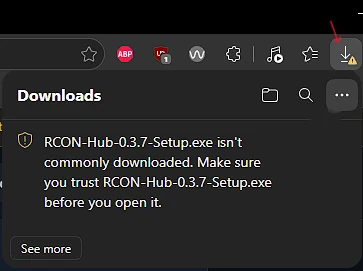
1. Edge says the file isn't commonly downloaded. 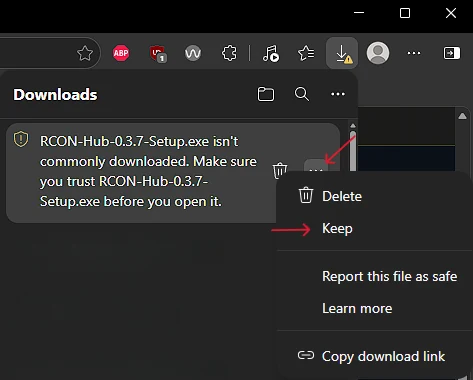
2. Open the download's … menu → Keep. 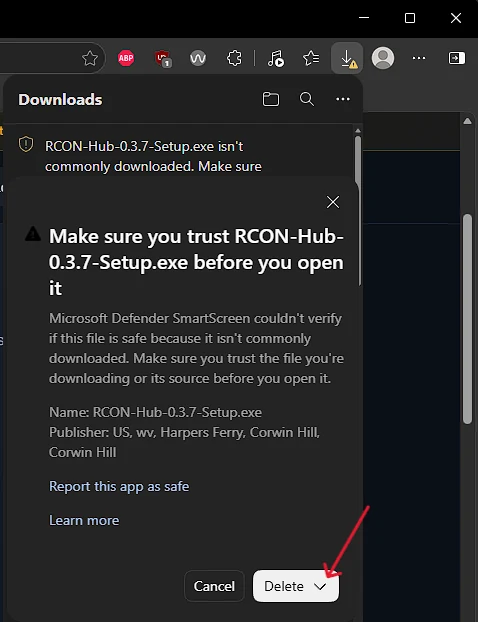
3. Click the arrow next to Delete. 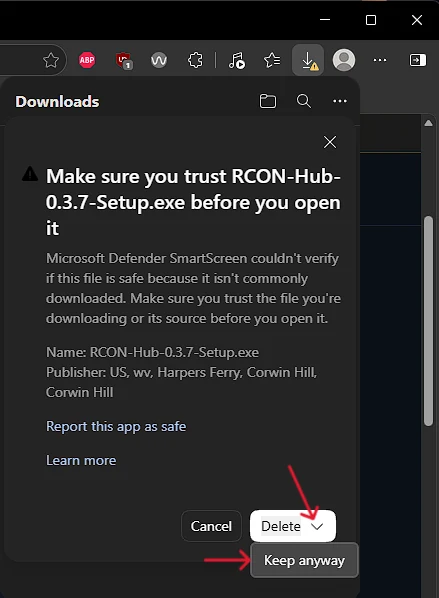
4. Choose Keep anyway. Done.
- Chrome: in the downloads list choose Keep (or Download suspicious file).
- Firefox: in the downloads list right-click the file → Allow download.
- When you run it: if Windows says Windows protected your PC, click More info → Run anyway.
RCON Hub and its game tools are beta software, provided as is, without warranty. Features change quickly and some haven't been tried on every host yet. You're responsible for your servers and their data.
- Back up first. Before you change settings, mods, rules or wipes, make a backup of the server's settings and world — and keep a copy off the server.
- Try changes on a test server or in "Just tell my staff" mode before going live.
- Check after updates that your server still starts and behaves as expected.
d44ccf6317c37db13f9cba8571fe2e691350ea4794e9bfabee600a823f59328a
By downloading you accept the licence agreement. Privacy: privacy notice.
Check it's the real file
Only keep a file you got from this page. To be sure it's the real one, compare its SHA-256 with the one above — in PowerShell, in your Downloads folder:
Get-FileHash .\RCON-Hub-0.3.13-Setup.exe -Algorithm SHA256You can also right-click the file → Properties → Digital Signatures to see the signature. Questions? Ask on ClanStop's Discord.
Games you can add after installing
Pick them in RCON Hub under Add game. Versions shown are the current tools for each game.
Recently in RCON Hub
- Hub 0.3.13 — Global bans are one click away again: on the ClanStop page, each game's Change in … ClanStop settings link (and its Open button when the game isn't running) now opens that game straight on its ClanStop settings, where Enforce ClanStop global bans and the Wall of Shame are set. Before, they opened the game's start page, which has no ClanStop tab inside the hub.
- Hub 0.3.12 — Bringing in an existing install asks before it replaces anything: when a game's tools found on this PC would replace servers already set up in the hub, the banner says so and Bring it in asks you to confirm first ("Replace what is set up here?"). What was there is still kept in a before-import-… folder in the game's data.
- Hub 0.3.11 — RCON Hub in your language: Spanish, Portuguese (Brazil), French, German, Italian, Dutch, Turkish, Russian, Ukrainian, Korean and Japanese. Pick it in Settings → General → Language, or leave it on Automatic to follow your browser. It's saved on your account, and every game's tools follow it.
Questions or problems?
Ask on ClanStop's Discord: support, ideas, game requests and ban appeals.